Turf Booking Software for Box Cricket, Football and Courts
TurfArena is turf booking software that keeps your website and front desk on one schedule: players book live slots and pay a UPI advance, the desk confirms, peak and floodlight rates apply themselves, and regulars use hour packs. Try the live demo or see the TurfArena overview.
Updated- Team in Jaipur, India
- MSME & GST registered
- Live product demos you can try
Turf booking software has one job before any other: make sure two teams never turn up for the same hour. After that come the jobs that decide your revenue — charging evening, weekend and festival hours properly, collecting an advance so a no-show still costs something, filling dead afternoon slots and bringing regulars back every week. Many box cricket and futsal venues still run on WhatsApp chats, a whiteboard and missed calls. TurfArena puts every playing area on one schedule that the booking website and the front desk both read.
It fits a single box turf, a multi-sport park, a badminton or pickleball centre and cricket nets. The live demo runs six areas — box cricket, 5-a-side and 7-a-side football, badminton, pickleball and nets — each with its own rates, size and surface. On the player side, Slot Radar lets someone drag across the hours they want, see the price build up and pay the advance, then receive a Match Pass with a QR code. The desk confirms it from the website inbox.
Ezibell Tech, an MSME and GST-registered software company in Jaipur, builds and sets up TurfArena. The demo runs in your browser with sample data; your venue’s live system uses one central database, WhatsApp messages from your number and your UPI or payment gateway, and usually goes live in about four to six weeks. This page is about the booking engine and front desk; for the full venue website with leagues, academy and events, see TurfArena: turf website and booking software.
What the turf booking software handles
Slot grid for every area
Areas as columns and hours as rows. Tap a free cell to book, block slots for maintenance or academy batches, move or cancel bookings and mark no-shows. An hour that is already taken cannot be booked again, from the desk or from the website.
Peak, holiday and floodlight pricing
Weekday evening peak, all-day weekend and holiday rates, and a floodlight charge after dark are calculated on every slot automatically, at the desk and on the website, so players see the full price before they pay and the desk never has to work it out.
UPI advance and settle-at-play
Collect the advance by UPI QR, cash or card when the slot is booked, start play on arrival, then settle the balance with floodlights and add-ons at the end. Receipts print or go out on WhatsApp. In the demo payments are marked by hand; your UPI or gateway is connected at rollout.
Online booking with Slot Radar
Players drag across the hours they want on their phone, see a live price breakdown with add-ons, pay the advance and get a Match Pass with a QR code, calendar entry and WhatsApp share. The request lands in the desk’s website inbox to confirm or decline.
Hour packs for regulars
Sell pre-paid hour packs from a customer’s profile and redeem pack hours at booking. Regular teams and office groups get a reason to keep booking with you, and the desk sees remaining hours on the customer’s record at a glance.
Find a game and squad tools
An open-games board where single players join with a first name or post their own game, plus a fair team picker, coin toss, live scorer and split-the-bill on the player’s phone. Short squads fill up instead of cancelling the slot.
Leagues, academy and events
Tournament fixtures, results, a live points table and bracket with online team entries; academy batches with seats and free-trial requests; and an event builder for birthdays and office games that blocks the turf in one step from the desk.
Reports and an idle-hour heat-map
Utilisation by area and hour, revenue, peak versus off-peak and top customers, with an hour-by-day heat-map that shows exactly which slots sit empty, so off-peak offers go where they are needed rather than across the whole week.
Pricing a turf hour: peak, off-peak and floodlights
Many turfs lose money not on empty hours but on underpriced full ones. Demand on a weekday evening, a Sunday morning or a festival weekend is very different from a Tuesday afternoon, yet many venues charge one rate because changing prices on a whiteboard is awkward. Turf booking software fixes the mechanics: you set base, peak, weekend, holiday and floodlight rules once, and every slot is priced by them consistently, whoever takes the booking.
Showing the price before payment matters as much as the price itself. When a player sees the base rate, the peak uplift and the floodlight charge itemised, there are fewer arguments at settlement. TurfArena’s pricing heat-map also shows players a week of rates and the cheapest free slots, which nudges price-sensitive groups towards quieter hours instead of losing them to another venue nearby.
- Set peak windows separately for weekdays and weekends
- Keep a holiday list for festival rates
- Apply the floodlight charge after dark, not all day
- Use the heat-map to aim off-peak offers at empty hours
No-shows, advances and double bookings
Double bookings happen when there is more than one source of truth: a board at the desk, a manager’s WhatsApp and an app that talks to neither. The fix is structural, not a matter of discipline. In TurfArena the website and the desk use the same schedule, so an hour requested online shows on the desk’s dashboard to confirm and cannot be booked by anyone else, and an hour booked at the desk disappears from the website.
No-shows are handled with money and reminders. A UPI advance at booking time makes a late cancellation cost something; a one-tap WhatsApp reminder to everyone playing today or tomorrow cuts forgotten bookings; and Find a game lets a team that is short of players fill the squad rather than cancel. Decide your cancellation and refund policy first, and we configure the advance to match it during set-up.
Booking website or turf booking app? What players actually use
Players book from their phones, but that does not mean they want to download your app. A mobile-friendly booking website opens from a link in a WhatsApp group or an Instagram bio, needs no install and works on any phone. That is why TurfArena’s player side is a fast website with a Match Pass QR rather than a store app. For venues with a large, loyal base, an Android and iOS app can follow later on the same back end.
The front desk is different: staff need speed, not discovery. The desk side is built around the slot grid, the website inbox and settlement. Start with whichever side hurts most. Many venues begin with the desk software alone and add the website once the schedule is reliable, because a website that shows wrong availability does more harm than having none.
- Small venue, mostly regulars: desk software and hour packs first
- Many new or walk-in players: add the booking website
- Leagues and coaching: add the tournament and academy modules
- Large loyal base: consider a store app later
How we work
- 1Demo call
A 20-minute call. We open the demo with your venue’s name, then note your areas, sports, opening hours, rates and how you take advances today.
- 2Venue set-up
Turfs and courts, sports, opening hours, base and peak rates, floodlight charges, holidays, advance rules and hour packs are configured in the first two weeks.
- 3Website and programmes
If you take the website, it gets your name, colours and photos, plus your leagues, academy batches and party packages. Many venues start with the desk alone.
- 4Desk, WhatsApp and UPI
Staff logins, WhatsApp messages from your number, UPI or payment-gateway details and receipts are set up and tested with your desk team on real evening-rush scenarios.
- 5Launch
Go live on your domain, share the booking link in your WhatsApp groups and put the QR at the gate. Rollout usually takes about four to six weeks.
- 6Review and support
After the first weeks we read the utilisation heat-map with you, adjust peak windows and off-peak offers for empty hours, and stay on for fixes and changes.
Why teams choose us
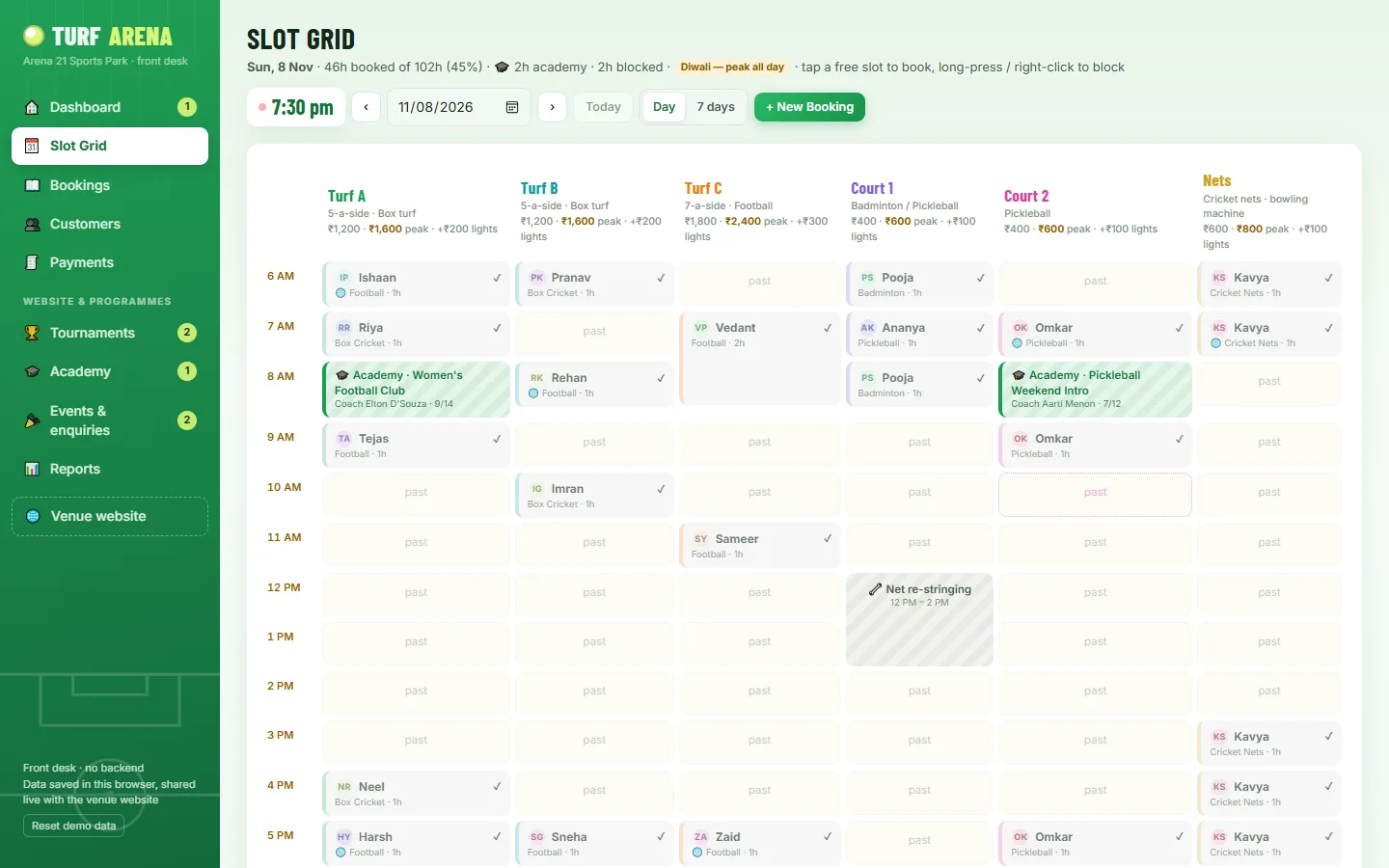 TurfArena live demoOpen the venue website and the front-desk CRM side by side: book a slot on one, confirm it on the other, then settle at play and watch it appear in the reports.Open →
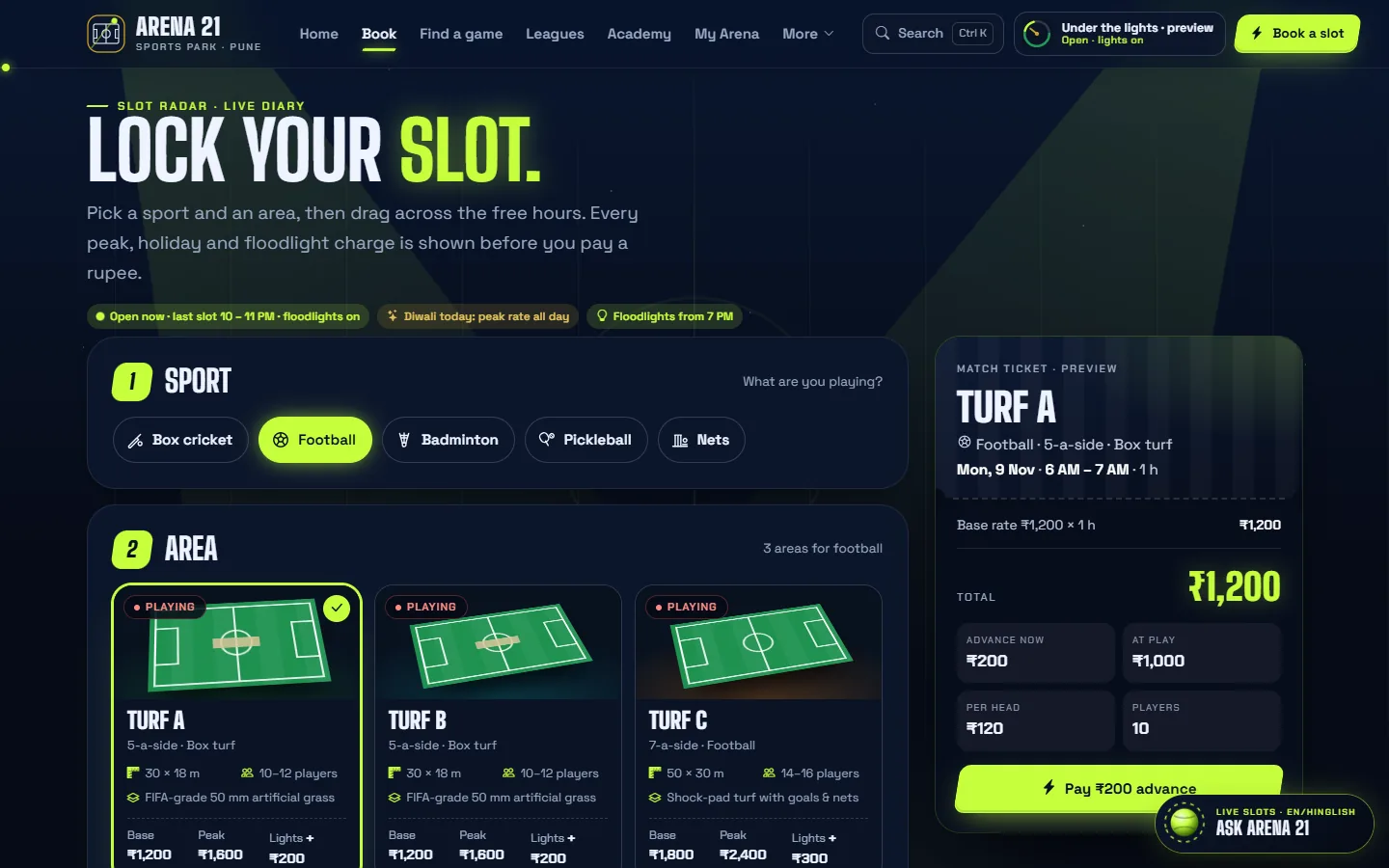 TurfArena: turf website and booking softwareEvery piece of the venue website and desk system on one page: Slot Radar, Match Pass, Find a game, leagues, academy, events and the rollout plan.Open →
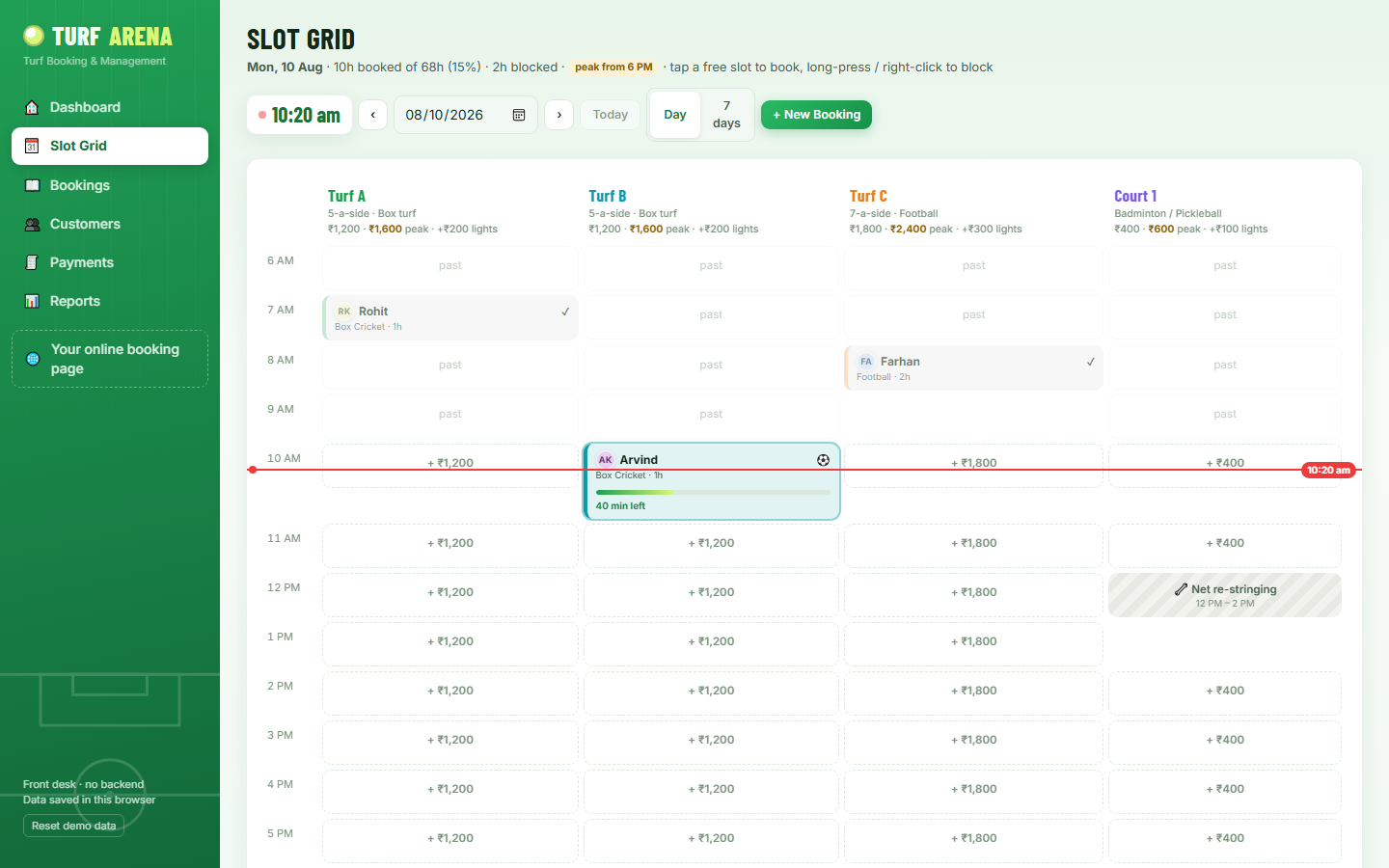 TurfArena CRM in detailA module-by-module tour of the front-desk software: slot grid, bookings, customers and hour packs, billing, WhatsApp and reports, with screenshots and the roadmap for the live system.Open →
Our stack for this work
What affects the cost of turf booking software
A single box turf and a six-area sports park need different set-ups, so there is no honest flat price. These factors move the quote; share your details and we send a fixed price after a free consultation.
Each turf, court or net has its own rates, timings and rules. More areas and sports mean more configuration and testing.
The front-desk CRM works on its own. The player website with Slot Radar, Match Pass and My Arena adds design and content work.
Tournament, academy and party modules are optional. Take the ones you actually run, and add others when you start them.
A UPI QR with confirmation at the desk is simplest. A payment gateway with automatic confirmation and refunds adds integration and testing.
One-tap pre-filled WhatsApp messages are quick to set up. Automated reminders through the WhatsApp Business API need templates and approval.
Most venues do well with the mobile website. An Android and iOS app is a separate build, quoted only if you want one.
Turf booking software: questions people ask
What is turf booking software?
Turf booking software manages the hourly schedule of a sports venue: which turf or court is free, who booked it, what they pay at peak or off-peak rates, the advance collected and the balance at play. TurfArena adds a player booking website, hour packs, leagues, academy and reports on the same schedule.
Can players book and pay online?
Yes. Players pick a slot on the booking website, see the full price and pay the advance by UPI, and the request reaches the desk to confirm. In the demo the UPI QR has a demo “mark as paid” button; for your venue we connect your UPI or a payment gateway during rollout.
Does it handle peak, weekend and floodlight pricing?
Yes. Weekday evening peak, all-day weekend and holiday rates and a floodlight charge after dark are calculated automatically on every slot, on the website and at the desk. You set the windows and rates; the software applies them the same way for every booking.
Is there a turf booking app players download?
Not by default. Players book on a mobile-friendly website that opens from a link, with no download, and get a Match Pass QR on their phone. If your venue wants an Android and iOS app as well, we build one on the same back end as a separately quoted project.
Will it work for a single box cricket turf?
Yes. It suits a single box turf, a multi-sport park, a badminton centre or cricket nets. The demo shows six areas so you can see the full range, but your set-up can have one area or many, with the same slot grid, pricing and advances.
How does it stop double bookings?
The website and the desk use one schedule. An hour booked at the desk disappears from the website, and an hour requested online shows on the desk’s dashboard to confirm and cannot be booked by anyone else. There is no separate board or chat to keep in step.
Can it run leagues and a coaching academy?
Yes. The tournament centre handles fixtures, results, a live points table, brackets and online team entries. The academy module covers batches, seats, coaches and free-trial requests, with academy hours blocked on the slot grid so they are never sold twice.
How long does it take to set up turf booking software?
TurfArena usually goes live in about four to six weeks: venue set-up and rates first, then the website if you take it, then staff logins, WhatsApp and UPI. Launch week is sharing the booking link and putting the QR at the gate.
How much does TurfArena cost?
It depends on the number of areas, the modules you need and integrations such as a payment gateway or WhatsApp automation. Tell us about your venue on WhatsApp and we send a fixed quote after a free consultation. There are no prices on this page because every venue is set up differently.
Fill every floodlit hour
WhatsApp +91 63774 18934 or email team@ezibelltech.com with your areas and opening hours. We’ll walk you through the live demo with your venue’s name and send a fixed quote.