AI Agent Course — Build Agents with LangGraph, Tools and MCP
A live AI agent course for working developers. Learn what separates an agent from a chatbot, then build one properly: tool calling, LangGraph state and memory, human approval steps, your own MCP server, evaluations and deployment on AWS, reviewed by senior engineers who build agents for clients.
Updated- Live online classes + recordings
- Senior Python developers as mentors
- Certificate with a verifiable ID
An AI agent course has to teach more than a loop that calls an LLM until it stops. Real agents choose tools, keep state across steps, pause for human approval before risky actions, recover from failures and leave a trace you can audit. The Ezibell AI Academy teaches that engineering in live online classes. It is run by Ezibell Tech, a software company based in Jaipur, and its mentors design and ship agentic systems in their day jobs.
Agents are not taught in isolation, because they fail without solid foundations. In the AI Engineer Accelerator, weeks one to seven cover typed async Python, LLM behaviour, structured outputs, retrieval and LangChain; weeks eight and nine build agents with LangGraph; week ten is the Model Context Protocol; week eleven adds evals and guardrails; and week twelve ships to AWS. By your first agent node, tool calling and validation feel routine.
Three routes cover agentic AI. Developers take the 14-week Accelerator on weekends. Developers on AWS add the 12-week AWS programme, whose Bedrock AgentCore module deploys a LangGraph agent with memory, tools and tracing. Anyone who wants an agent roadmap built around their own job can work 1:1 with a mentor. We do not teach machine learning or model training. Message +91 82097 16316 on WhatsApp for fees and EMI options.
What you build on the AI agent course
The agent loop and the ReAct pattern
How an agent reasons, picks an action, observes the result and decides what to do next, and how to bound that loop with step limits and clear stop conditions so it cannot wander or run up a bill.
Tool design and function calling
Turning APIs, databases and internal functions into tools an LLM can call: clear names and descriptions, JSON-schema arguments, Pydantic validation and retries when the model gets an argument wrong. Tool design decides much of an agent’s reliability.
LangGraph state, nodes and routing
Model an agent as a graph: typed state, nodes that each do one job, and edges with conditional routing that decide what runs next. Graphs make agent behaviour inspectable and testable, which is why LangGraph is the core framework of the agent modules.
Persistence, checkpoints and memory
Checkpoints save an agent’s state after each step, so a long task can resume after a crash or wait for an approval. You separate short-term conversation memory from long-term facts, and on AWS you use AgentCore Memory for both.
Human-in-the-loop approvals
LangGraph interrupts pause an agent before it sends a message, changes a record or triggers a payment, show a person what it intends to do, and continue only once approved or edited. The Accelerator’s agent project includes approval steps by design.
Multi-agent and long-running agents
Supervisor and swarm patterns for work too broad for one agent, plus long-running and background agents. You also weigh their cost in tokens, latency and debugging effort.
Your own MCP server
Build a Python MCP server that exposes a database and an API as tools, resources and prompts over stdio or streamable HTTP, add authentication, connect it to Claude Desktop and an IDE, then call it from your LangGraph agent.
Agent evals, tracing and safety
Evaluate whether an agent chose sensible tools and reached the right outcome, trace every step in LangSmith or Langfuse, watch cost and latency, and defend against prompt injection and jailbreaks. Then deploy with monitoring on AWS.
Choose your programme
Every track is live, mentor-led and project-based. Tap one for the full syllabus, duration and FAQ.
AI Engineer Accelerator
Fourteen weekend weeks with LangGraph agents in weeks 8–9 and MCP in week 10, built on structured outputs and RAG, then evals, guardrails and AWS deployment, including a multi-tool agent with human approval steps.
Python developers who must run agents inside AWSAWS for Python Developers: Serverless, Containers & Bedrock
Twelve weekend weeks ending in Bedrock Agents with Lambda action groups and an AgentCore module covering Runtime, Memory, Gateway for MCP tools, Identity and Observability; you deploy a LangGraph agent with memory, tools and tracing.
Developers who want an agent roadmap around their own job1:1 AI Career Mentorship
Four one-hour 1:1 sessions a month with a senior engineer, reviewing your agent design and pull requests on a project you choose, plus a monthly mock interview. Three months recommended.
Agent vs chatbot: what actually makes an AI agent
An AI agent is an LLM-driven program that decides its own next step, calls tools to act and keeps going until a goal is met, whereas a chatbot only produces replies. The difference is control flow. In a chatbot, your code decides what happens and the model writes text. In an agent, the model chooses which tool to call, with which arguments, and when the job is done, while your code enforces the limits.
That autonomy is useful and risky in equal measure. Many problems sold as agents are better solved with a fixed workflow: if the steps never change, a deterministic pipeline with one or two LLM calls is cheaper, faster and easier to test. A good agent course teaches you to make that call first, then to give an agent only the tools, permissions and steps it truly needs.
- Chatbot: answers questions, with no tools and no state beyond the conversation
- Workflow: fixed steps with LLM calls inside, predictable and cheap
- Agent: chooses tools and steps at run time, so it needs limits, approvals and evals
- Multi-agent: specialised agents coordinated by a supervisor or a swarm
Tool calling, state, memory and human-in-the-loop
Tool calling is how an agent acts: the model returns a structured request naming a tool and its arguments, your code validates and runs it, and the result goes back into the conversation. Most agent bugs live here, in vague tool descriptions, overlapping tools, arguments that fail validation or results too long for the context window. A few sharp tools with strict schemas usually beat a large toolbox.
State and memory decide whether an agent can handle real work. LangGraph keeps a typed state object that every node reads and updates, and checkpoints persist it so a task survives restarts and can be replayed for debugging. Human-in-the-loop builds on the same mechanism: the graph interrupts before a sensitive node, stores its state and resumes when a person approves, edits or rejects the proposed action.
MCP servers and evaluating agents
The Model Context Protocol (MCP) is an open standard that lets any compatible host, such as Claude Desktop, an IDE or your own agent, discover and use tools, resources and prompts from a server you write once. Hosts reach servers through clients, over stdio for local tools or streamable HTTP for remote ones. Because a server can expose real data and actions, authentication and injection defences are part of the build.
Evaluating an agent means checking the path as well as the answer. An agent can reach a correct result through a wasteful or unsafe sequence of tool calls, or fail even though each step looked reasonable. You build evaluation sets of tasks, score outcomes with LLM-as-judge and human review, inspect traces for wrong tool choices, and rerun the tests whenever a prompt, tool or model changes.
How the course works
- 1Talk to a mentor
WhatsApp or call +91 82097 16316. A mentor checks your experience with Python and APIs and recommends the Accelerator, the AWS programme or 1:1 mentorship.
- 2Confirm your track
Choose your programme and weekend batch. The fee, EMI options and refund and batch-transfer terms reach you in writing before any payment.
- 3Foundations before agents
Live weekend classes take you through LLM behaviour, structured outputs, retrieval and LangChain first, so tool calling and validation are familiar before the agent modules begin. Every session is recorded.
- 4Agent, MCP and eval labs
Build a multi-tool LangGraph agent with human approval steps, publish your own MCP server and add evals, tracing and guardrails. Mentors review your graphs and code on pull requests.
- 5Deploy and demo
Ship your capstone on AWS, or deploy a LangGraph agent on Bedrock AgentCore in the AWS programme, and present it on demo day after a team-lead architecture review.
- 6Certificate and next steps
Your mentor signs off the work and your certificate is issued with a unique ID verifiable at /certificates, alongside AI-engineer resume and interview preparation.
Why learn with us
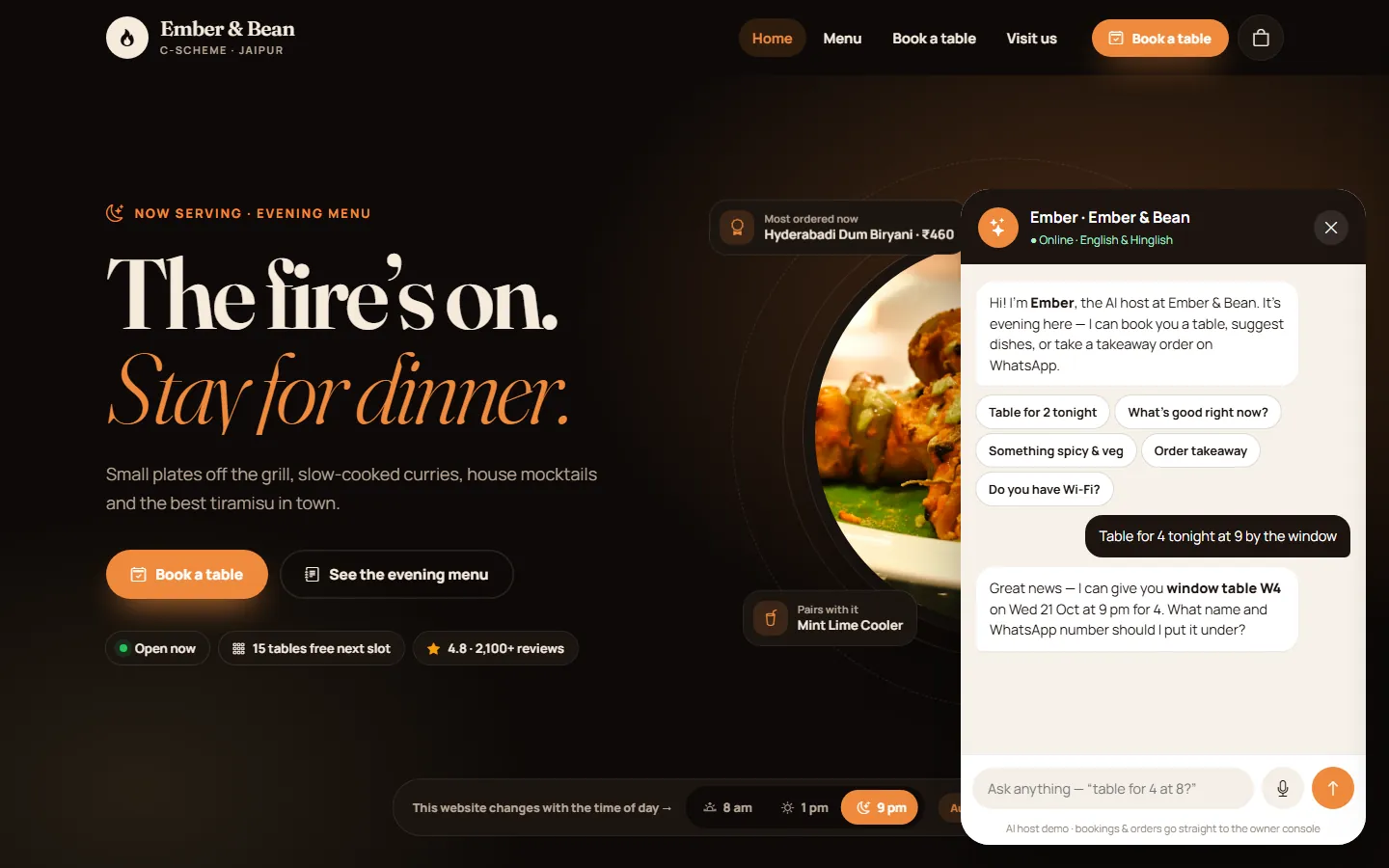 DinePilot demoAn in-house demo our team built: an AI host that takes table bookings on a live floor plan and WhatsApp takeaway orders. It is an interactive demo you can try in your browser, and it shows the action-taking experience agents power.Open →
What you’ll work with
What affects the fee for an AI agent course
Agent skills build on other skills, so the fee depends on what you know and how deep you go. The main factors:
The Accelerator expects a year or more as a developer. If you are newer, the Launchpad’s Python foundations and introduction to agents and tool calling come first, which adds weeks.
The Accelerator covers LangChain, LangGraph and MCP over 14 weeks. The 12-week AWS programme adds Bedrock Agents and AgentCore for teams that must run agents inside AWS.
A weekend cohort shares mentor time in a small group. 1:1 mentorship gives you four one-hour sessions a month, focused on the agent you want to build.
Agents make several model calls per task, so lab usage runs a little higher than for a chatbot, though still small. Mentors show you step limits, cheaper models and spending caps. Current fees and EMI options are shared on WhatsApp.
Ai agent course: questions people ask
What will I learn in the AI agent course?
You learn to design, build, evaluate and deploy AI agents: the ReAct loop, tool calling with validated arguments, LangGraph state, routing, checkpoints and memory, human-in-the-loop approvals, supervisor and swarm patterns, and your own MCP server. Evals, tracing, guardrails and AWS deployment follow, so your agent is production-shaped rather than a notebook demo.
What is the difference between an AI agent and a chatbot?
A chatbot replies; an agent decides and acts. An AI agent uses an LLM to choose which tool to call next, runs it, reads the result and continues until the goal is met. A chatbot only generates answers, so agents need limits, approval steps and evaluations that chatbots do not.
Do I need coding experience for an agentic AI course?
Yes. The AI Engineer Accelerator expects at least a year as a developer, because agents are software engineering: APIs, validation, state and error handling. Java, Node, .NET and PHP developers get a fast-track Python bridge in week one. Complete beginners should start with the Python to AI Launchpad, which introduces agents and tool calling near the end.
Does the course cover MCP?
Yes. Week 10 of the Accelerator is dedicated to the Model Context Protocol: hosts, clients and servers, building servers in Python with tools, resources and prompts, stdio and streamable HTTP transports, authentication, connecting to Claude Desktop and IDEs, using MCP tools in LangGraph agents and containing security risks. You publish your own server.
Is this a LangGraph agents course, or are other frameworks used?
LangGraph is the core agent framework, with LangChain for building blocks and LangSmith for tracing. In the AWS programme you also build Bedrock Agents with Lambda action groups and deploy LangGraph and Strands agents on Bedrock AgentCore.
How long is the AI agent course, and when are classes?
The AI Engineer Accelerator runs 14 weeks with about 105 live hours on weekends, with agents in weeks 8–9 and MCP in week 10. The AWS programme is 12 weekend weeks, with AgentCore in week 10. Classes are live online and recorded.
Will I get a certificate and placement support?
You get a certificate with a unique ID verifiable at /certificates once your mentor signs off your labs and capstone; it is a professional training certificate, not a degree or accreditation. We do not guarantee placement. The Accelerator includes AI-engineer resume and interview preparation, and mentors share opportunities from our network.
Can I build an agent for my own company’s workflow?
Yes, within limits. Many learners shape their capstone or 1:1 mentorship around a real work problem, without confidential details. Companies that want agents built on their own systems can book corporate upskilling, where labs can use your stack and, under NDA, your own use cases.
Build your first production-shaped AI agent
WhatsApp or call +91 82097 16316 with your experience and the agent you want to build. A senior engineer will recommend a track, share the current fee and EMI options, and confirm the next weekend batch.