Jewellery Billing Software with HUID, Gold Rate and GST
Aurelia is jewellery billing software where the day’s gold rate drives everything: set it once and every HUID tag, bill and scheme follows. Old-gold exchange, split UPI payments and GST invoices sit on one counter screen. Open the live demo or see the Aurelia overview.
Updated- Team in Jaipur, India
- MSME & GST registered
- Live product demos you can try
Jewellery billing software has to get one calculation right hundreds of times a day: weight × today’s rate, plus making, plus stones, plus GST, minus any old gold the customer brings in. When the rate moves, a manual shop reprices tags by hand and the counter works out exchange deductions on a calculator. Aurelia makes the rate board the single input. The owner sets the day’s rates once; every tagged piece, every bill and the store website reprice from it, and each invoice line carries the HUID, purity and rate per gram.
Mandatory BIS hallmarking in notified districts means every piece carries a six-character HUID, and customers increasingly ask for it. Aurelia keeps stock at tag level: HUID, purity, weight, making and stone charges and a thumbnail per piece, with printable tag labels that carry a QR code. The live demo lets you set a rate, bill a tagged piece with an old-gold exchange and a split payment, and print the GST invoice, all in your browser with sample data.
Ezibell Tech, an MSME and GST-registered software company in Jaipur, builds and sets up Aurelia for single-counter stores and larger showrooms, usually in about four to six weeks. We configure the bill; your CA decides the tax treatment, and we set the invoice to match. This page covers the counter software. For the customer-facing store website with live prices, a 3D Design Studio and 48-hour reservations, see Aurelia: jewellery website and software.
What the jewellery billing software covers
Daily rate board
Set the day’s 22K, 18K and silver rates once each morning. Every stock tag, open bill and website price recalculates, and a rate history shows the trend. In the demo, rates are entered by hand; a live bullion rate feed is on the roadmap and can be scoped for your store.
HUID-tagged stock
Each piece is a tag with its HUID, purity, weight, making and stone charges and a thumbnail. Printable tag labels carry a QR code, the live tag price follows the rate board, and stock can be filtered by in stock, reserved or sold.
GST invoices with HUID per line
A full tax invoice with HUID, purity, rate per gram, making, HSN 7113, CGST and SGST, the amount in words and a QR code. A split payment across UPI QR, cash and card is recorded on the same bill, and vouchers can be redeemed against it.
Old-gold exchange at the counter
Enter the customer’s old gold by weight and purity, deduct stones, and the exchange value is applied to the bill at today’s rate. Customers can estimate the value on your store website before they visit, so there are fewer surprises at the counter.
Karigar orders and repairs
Custom orders and repairs are assigned to a karigar with an advance, a due date and a ready alert. Mark the job ready, notify the customer on WhatsApp in one tap, and deliver with the balance worked out automatically.
Gold Saver scheme
Enrol customers in an 11+1 style instalment scheme on your own terms, collect instalments by UPI QR, print a passbook and issue a maturity voucher that is redeemed against a purchase. The calculator shows instalments and grams at today’s rate and never promises returns.
Price X-ray and 48-hour reservations
On the store website every piece shows metal, making, stones and GST layer by layer, and a customer can hold a piece for 48 hours. The counter sees the hold and converts or releases it; expired holds release themselves.
Occasions and reports
Customer birthdays and anniversaries with pre-filled WhatsApp wishes, so regular customers hear from you at the right time, plus reports for daily collections, sales by category, metal mix, top customers and the website funnel from piece viewed to showroom visit.
How a jewellery bill should be calculated, and shown
A clear jewellery bill separates four things: metal value (weight × the day’s rate for that purity), making charges as your store calculates them, stones priced on their own line, and GST. Customers distrust bills where making is folded into the rate or stones are weighed as gold. Aurelia shows each layer on the invoice and on the website’s Price X-ray, so the conversation at the counter is about the piece, not the arithmetic.
Old-gold exchange is where most errors happen. Purity has to be tested and entered, stone weight deducted and the exchange value applied at today’s rate. How GST applies to an exchange is a question for your CA, and practice varies between stores; billing software should follow your CA’s treatment and print it clearly rather than bake in a guess. During set-up we share sample exchange invoices with your CA and adjust the lines to what they confirm.
- Metal: weight × today’s rate for that purity
- Making charges on their own line
- Stones and diamonds priced separately
- Old gold: purity, stone deduction, value at today’s rate
- GST lines as your CA confirms, with HSN 7113
HUID, hallmarking and what customers now expect
Under BIS hallmarking, gold jewellery sold in notified districts must carry the BIS mark, the purity grade (such as 22K916) and a six-character alphanumeric HUID. For a jeweller this is first a stock-keeping job: every tag needs its HUID recorded so the invoice can quote it. Aurelia stores the HUID at tag level, prints it on tag labels and puts it on every invoice line, so the customer’s bill matches the stamp on the piece.
Customers have caught up. Many check a HUID in the BIS CARE app, and they ask what 916 or 750 means. The Aurelia store website includes a HUID check and a short hallmark guide, so that explanation happens before the visit. Treat this as a trust feature: a shop that shows HUID, purity and the price breakdown upfront spends less time at the counter defending its numbers.
Choosing jewellery software: a checklist for the counter
Ask any vendor to bill a real scenario in front of you: a 22K necklace with stones, an old-gold exchange with a stone deduction, a split payment of UPI and cash, and a scheme voucher redeemed on the same bill. If that takes many screens, it will be slow on a wedding-season Saturday. Then check that the rate is entered once and used everywhere: tags, bills, schemes and the website.
Look beyond billing too. Karigar jobs need due dates and ready alerts, schemes need instalment tracking and maturity, and occasions bring customers back. Be honest about what you need on day one: barcode or RFID scanning, GST e-invoicing and a GST returns export are on Aurelia’s next phase, not in the demo today. If they are must-haves for your store, we scope them in your quote rather than assume them.
How we work
- 1Demo call
We open the demo with your store’s name, bill a sample piece with an exchange, and note your purities, making-charge method, scheme terms and payment modes.
- 2Stock and rules
Stock with HUIDs and weights, making charges, purities, Gold Saver terms, GST details and staff roles are set up in the first two weeks, from your spreadsheets or registers.
- 3Your CA checks the bill
We share sample invoices, including an old-gold exchange and a scheme redemption, for your CA to review. Exchange and GST lines are adjusted to their treatment before launch.
- 4Counter routine
The morning rate-board routine, WhatsApp messages from your number, UPI details, tag labels and the invoice format are tested with your counter staff on real bills.
- 5Website, if you want it
The store website goes live with live-priced collections, 48-hour reservations and the Design Studio, or you start with the counter software alone and add it later.
- 6Launch and support
Go live in about four to six weeks from the first call. We stay on after launch for fixes, new collections and changes to your scheme terms.
Why teams choose us
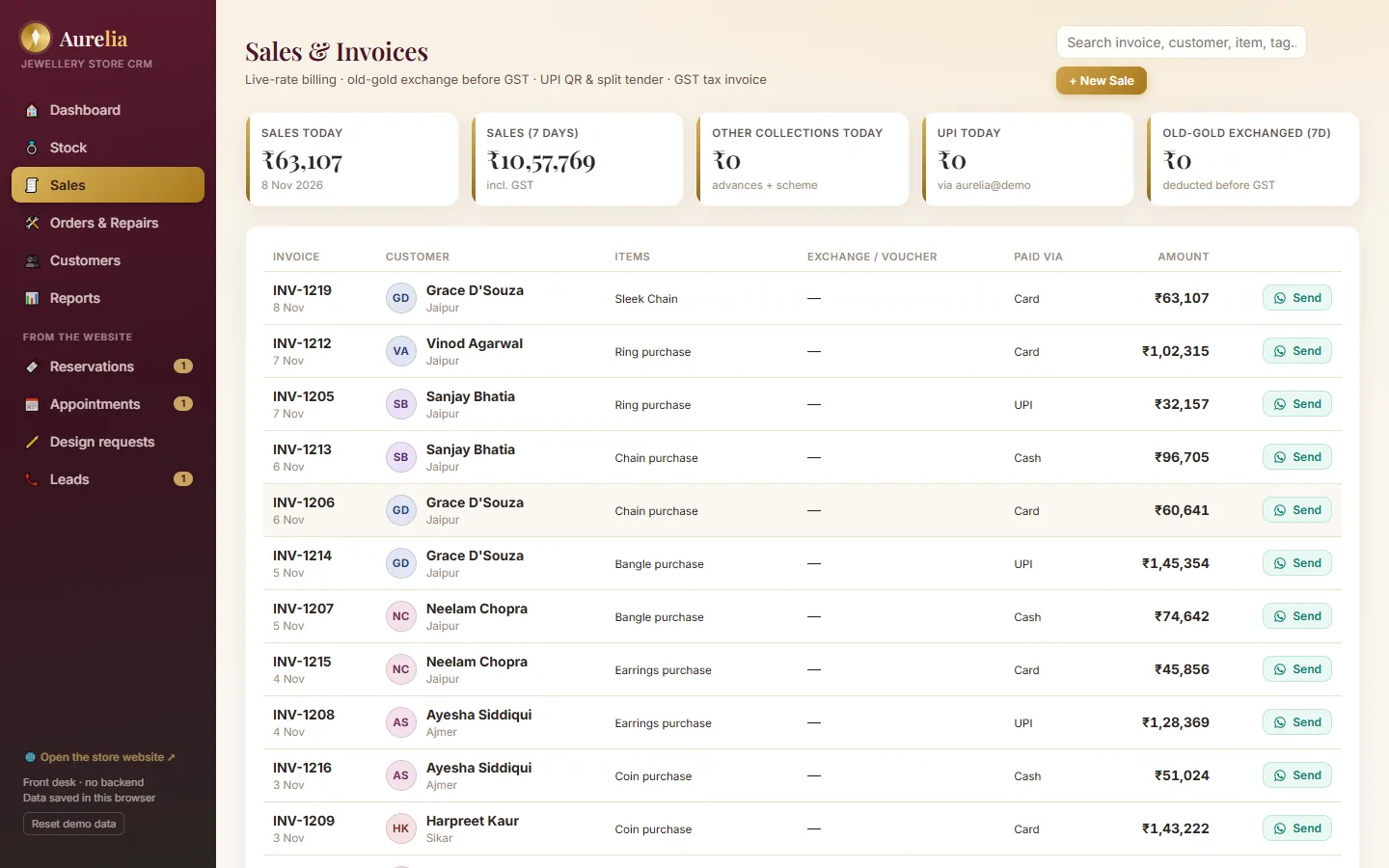 Aurelia live demoSet the day’s rate, bill a HUID-tagged piece with an old-gold exchange and a split payment, and print the GST invoice, all in your browser with sample data.Open →
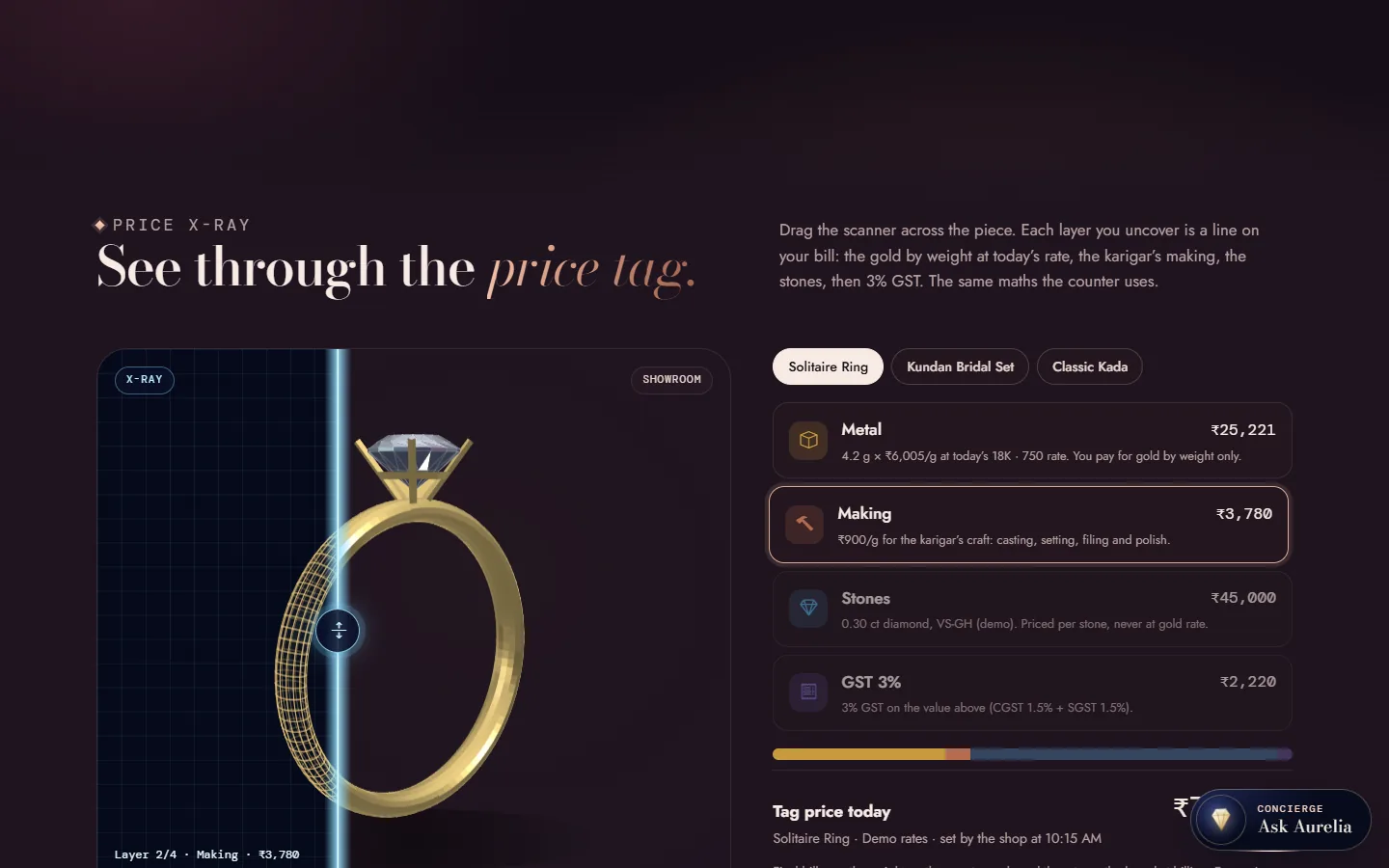 Aurelia: jewellery website and softwareThe store website and counter CRM together on one page: live rate board, Price X-ray, 48-hour reserve, 3D Design Studio, Gold Saver and the rollout plan.Open →
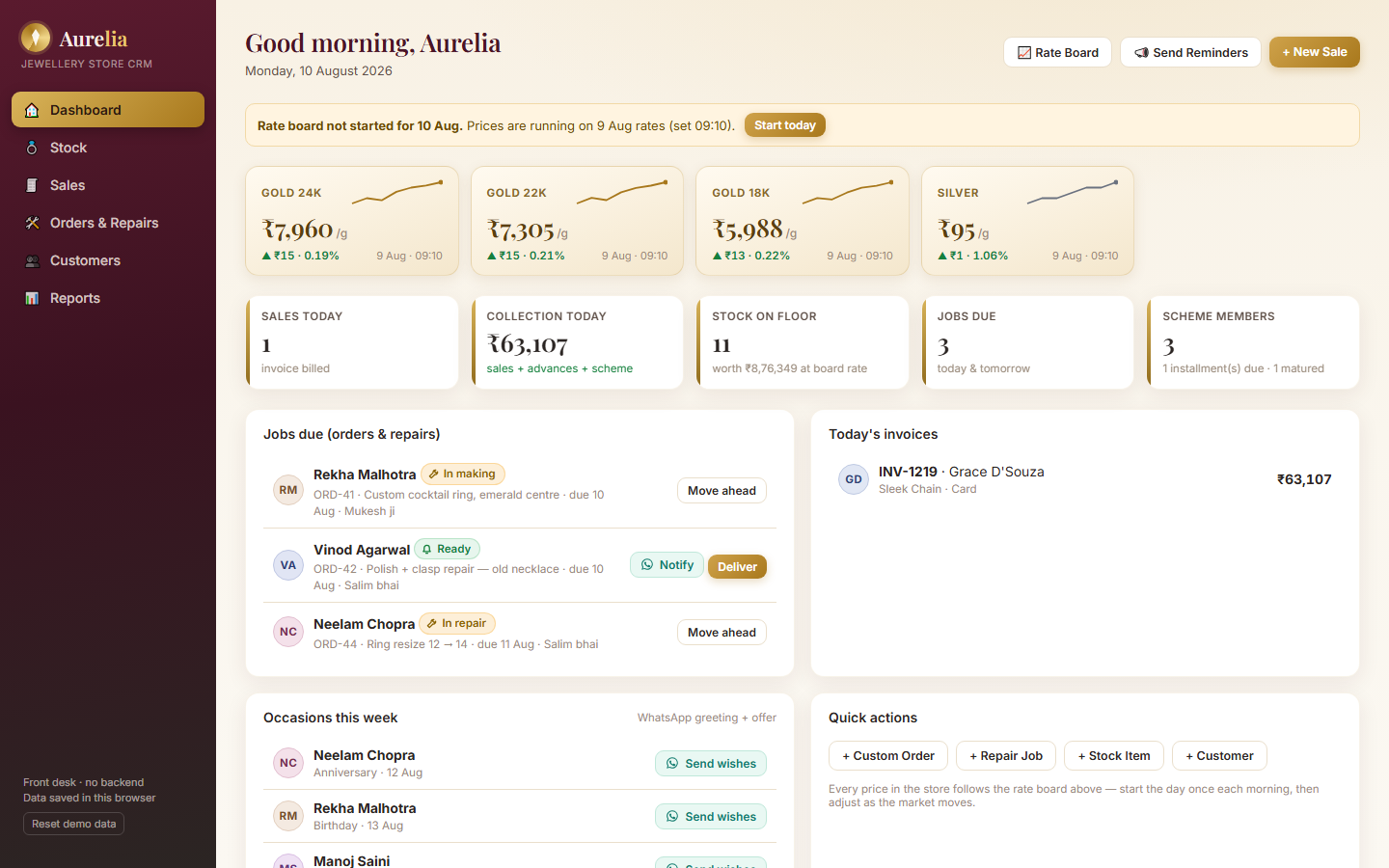 Aurelia CRM in detailA module tour of the counter software: rate board, inventory, billing, orders and repairs, customers and scheme, and reports, with screenshots and the product roadmap.Open →
Our stack for this work
What affects the cost of jewellery billing software
A single-counter store and a multi-counter showroom need different set-ups, so there is no honest flat price. These factors move the quote; share your details and we send a fixed price after a free consultation.
More tagged pieces mean more data to load and check. More counters and staff roles add logins and testing.
The counter CRM works on its own. The store website with live prices, reservations and the Design Studio adds design and content work.
A clean spreadsheet of tags with HUIDs and weights loads quickly. Data spread across old software or paper registers takes longer.
Label printers work with the printable tags. Barcode or RFID scanning is a next-phase item and is scoped with your hardware if you need it.
A live bullion rate feed, GST e-invoicing or an accounting export are separate pieces of work, quoted only if you want them.
Gold Saver terms and karigar workflows vary by store. The closer they are to the standard set-up, the quicker they are to configure.
Jewellery billing software: questions people ask
What should jewellery billing software do?
Jewellery billing software should price every piece from the day’s rate, show metal, making, stones and GST separately, handle old-gold exchange and split payments on one bill, and print a GST invoice with HUID and purity on each line. Aurelia also covers stock tags, karigar orders, a Gold Saver scheme and reports.
Does the invoice show the HUID?
Yes. Every invoice line carries the piece’s HUID, purity, weight and rate per gram, along with making, HSN 7113, CGST and SGST and the amount in words. The HUID is stored on the stock tag, so it flows to the bill without retyping.
How does the daily gold rate work?
The owner enters the day’s rates once on the rate board, and every tag price, open bill and website price recalculates from them, with a rate history for the trend. Rates are entered by hand in the demo; a live bullion rate feed is on the roadmap and can be scoped for your store.
How is old-gold exchange handled on the bill?
The counter enters the old gold by weight and purity, deducts stones, and the exchange value is applied to the bill at today’s rate. The GST treatment of exchange is set to what your CA confirms during rollout, and the invoice shows it clearly.
Does Aurelia generate GST e-invoices or file returns?
Not today. Aurelia prints a full GST tax invoice, but e-invoicing (IRN) and a GST returns export are on the next phase of the product. If your turnover requires e-invoicing, tell us on the demo call and we will scope it in your quote. Filing returns stays with your CA.
Can we run a Gold Saver scheme in it?
Yes. Aurelia supports an 11+1 style instalment scheme on your terms: enrolment, instalment collection by UPI QR, a printable passbook and a maturity voucher redeemed on a purchase. It is not investment advice, and we recommend your scheme terms are reviewed by your own advisers.
Does it support barcode or RFID tags?
Tags print today with a QR code, and the live tag price follows the rate board. Barcode and RFID scanning are on the next phase of the product, so if your store depends on them we scope the scanning with your hardware as part of the quote.
How long does it take to set up jewellery billing software?
Aurelia usually goes live in about four to six weeks. Stock, making charges, purities, scheme terms and GST details come first; then your CA reviews sample invoices; then the counter routine, WhatsApp and UPI; and the store website if you take it.
How much does Aurelia cost?
It depends on your stock size, the number of counters, the modules you need and integrations such as a rate feed or e-invoicing. Tell us about your store on WhatsApp and we send a fixed quote after a free consultation. There are no prices on this page because every store is set up differently.
Bill a piece with your store’s name on it
WhatsApp +91 63774 18934 or email team@ezibelltech.com with your stock size and how you bill today. We’ll walk you through the live demo and send a fixed quote.