Clinic Management Software with a Live Token Queue
ClinicPro is clinic management software built for Indian OPDs: per-doctor slots with no double booking, a token queue patients can follow from home, e-prescriptions with an allergy check, follow-ups that book themselves and UPI billing. Open the live demo or read the ClinicPro overview.
Updated- Team in Jaipur, India
- MSME & GST registered
- Live product demos you can try
Most clinic management software sold in India was designed around the bill, not the waiting room. In a busy OPD the real problems come earlier: reception answering “is the doctor free today?” all morning, patients arriving an hour early because they cannot see the queue, handwritten prescriptions that go missing, and “come back after five days” that nobody books. ClinicPro starts from the queue. Every doctor has a slot grid and a token line, patients see their position on their phone, and the consultation, follow-up and bill all hang off the same visit.
It suits a single-doctor clinic, a polyclinic with visiting consultants and a multi-speciality centre alike. The live demo runs a clinic with 18 specialities, each with its own doctors and OPD days, so you can see how booking opens only on the days a consultant actually sits. Open the reception CRM and the patient website side by side: book on one and the appointment appears in the other’s slot grid, marked as booked online. Everything runs in your browser with sample data.
Ezibell Tech, an MSME and GST-registered software company in Jaipur, builds and sets up ClinicPro, usually in about four to six weeks. This page covers the software at the reception desk and in the doctor’s room. The clinic CRM and the patient website work on their own or together, so you can start with whichever solves today’s problem. For the patient-facing website with speciality pages, video consults and pre-visit check-in, see ClinicPro: clinic website and software.
What the clinic management software does
Live token queue per doctor
Tokens are issued per doctor at check-in, reception sees a “now serving” view, and the doctor starts the next consultation in one tap. On the clinic website patients track their position and wait, with a “leave home at” time, so fewer people crowd the waiting room early.
Slot grid with no double booking
Doctors as columns, time slots as rows. Reception books, reschedules or cancels in a tap and a taken slot cannot be booked twice. Bookings made on the clinic website arrive in the same grid marked as online, so phone and web bookings never clash.
e-Prescriptions with an allergy check
Prescription templates for common presentations, vitals recorded alongside, and a drug–allergy check on every line: a penicillin-allergic patient prescribed amoxicillin gets the row flagged red and a confirmation step before saving. Prescriptions and sick-leave certificates print cleanly.
Follow-ups that book themselves
The doctor sets “review after N days” in the consultation and the next visit is booked into a free slot. The clinic’s free follow-up rule (seven days in the demo) is applied at billing automatically, so the fee no longer depends on who is at the desk.
UPI QR, cash and card billing
A scan-to-pay UPI QR for the exact amount, cash with change, card with a reference, free follow-ups recognised automatically, a printable A5 receipt with the amount in words, and a day-end close-out split by cash, UPI and card.
Now Serving display
Large per-doctor token numbers on any waiting-room TV or spare monitor, updated live from the desk. Patients stop asking reception who is next, and doctors see the same queue from their room without walking out to check.
Patient records
A patient registry with allergies, conditions, visit history, prescriptions and certificates. A returning patient is recognised at booking, and the doctor sees the history and allergy flags before the consultation starts rather than asking the same questions again.
OPD days, video consults and intake
Core doctors and visiting consultants each have their own OPD days, and booking opens only when they sit. Video consult slots are booked like any other, and the intake desk shows the patient’s pre-visit check-in (symptoms, medicines, allergies) before they arrive.
Choosing clinic software: what matters in an Indian OPD
Start with the queue, not the feature list. Ask any vendor to show you a Monday morning: three doctors, walk-ins mixed with booked patients, one doctor running late. Good software keeps a separate token line per doctor, lets reception see who has checked in and who is still on the way, and gives patients an honest idea of the wait. A calendar alone will not empty your waiting room.
Then check the paperwork and the money. Prescription templates should be quick to edit, allergies should be checked on every line, and your own rules (follow-up windows, visiting-consultant days, fees by doctor) should be settings, not habits in one receptionist’s head. Most patients now pay by UPI, so a QR for the exact amount and a clean day-end close-out matter more than an elaborate accounting module.
- A separate token line per doctor, visible to patients
- Online and phone bookings in one slot grid
- An allergy check on every prescription line
- Follow-up windows and OPD days as settings
- UPI QR billing with a day-end close-out
Token queue, appointments or both? A short decision guide
Clinics in India usually run one of three patterns. Walk-in OPDs need tokens and a visible queue more than appointments. Appointment-led practices, such as dental, physiotherapy or psychiatry, need a slot grid, reminders and few gaps. Most clinics are mixed: booked patients get a time, walk-ins get a token, and reception merges the two. ClinicPro handles the mixed case by giving every patient a token at check-in, so one queue per doctor holds both.
Slot length is the setting that matters most. Too short and every doctor is running late by noon; too long and the evening OPD has gaps. We set slot lengths per doctor during rollout and review them with you once the reports for patients per day and per doctor have a few weeks of real data. Free follow-up windows work the same way: they are your clinic’s rule, applied by the software rather than remembered at the desk.
- Walk-in heavy OPD: start with tokens and the Now Serving display
- Appointment-led speciality: start with the slot grid and reminders
- Mixed clinic: both, with tokens issued at check-in
- Visiting consultants: OPD days so booking opens only when they sit
Patient data and what a live rollout adds
Clinic software holds health information, and India’s Digital Personal Data Protection Act, 2023 expects personal data to be collected for a clear purpose and handled with care. In practice that means staff logins with roles so reception does not see what only a doctor needs, OTP login for patients, encrypted hosting in India, regular backups and a record of who changed what. Ask any vendor where the data sits and who can read it.
Be clear about what the demo is. The ClinicPro demo runs entirely in your browser with sample data, so you can click through reception, doctor and billing screens without sharing anything. Your clinic’s live system adds the central database, the logins, WhatsApp messages from your number and backups, all scoped with you during rollout. Nothing in the software diagnoses: the body map and the website assistant only suggest which doctor to see and always show emergency guidance for red-flag symptoms.
How we work
- 1Demo call
A short call on WhatsApp or video. We open the demo with your clinic’s name on it and note your doctors, OPD timings, fees and follow-up rules.
- 2Clinic set-up
Doctors, specialities, sessions, slot length, fees, follow-up rules and prescription templates are configured in the first two weeks, and we agree how existing patient records will be brought in.
- 3Desk and doctor logins
Reception and doctor logins, WhatsApp messages from your number, UPI details and the receipt format are set up and tested with your staff on real scenarios.
- 4Patient website, if you want it
Take the patient website too and it is branded with your name and colours, with bookings flowing into the same slot grid. Many clinics start with the desk alone.
- 5Go live
The Now Serving display goes on the waiting-room TV and reception gets a short hand-over. Rollout usually takes about four to six weeks from the first call.
- 6Review and support
After launch we stay on for fixes and small changes, and review slot lengths, templates and follow-up rules with you once a few weeks of real data come in.
Why teams choose us
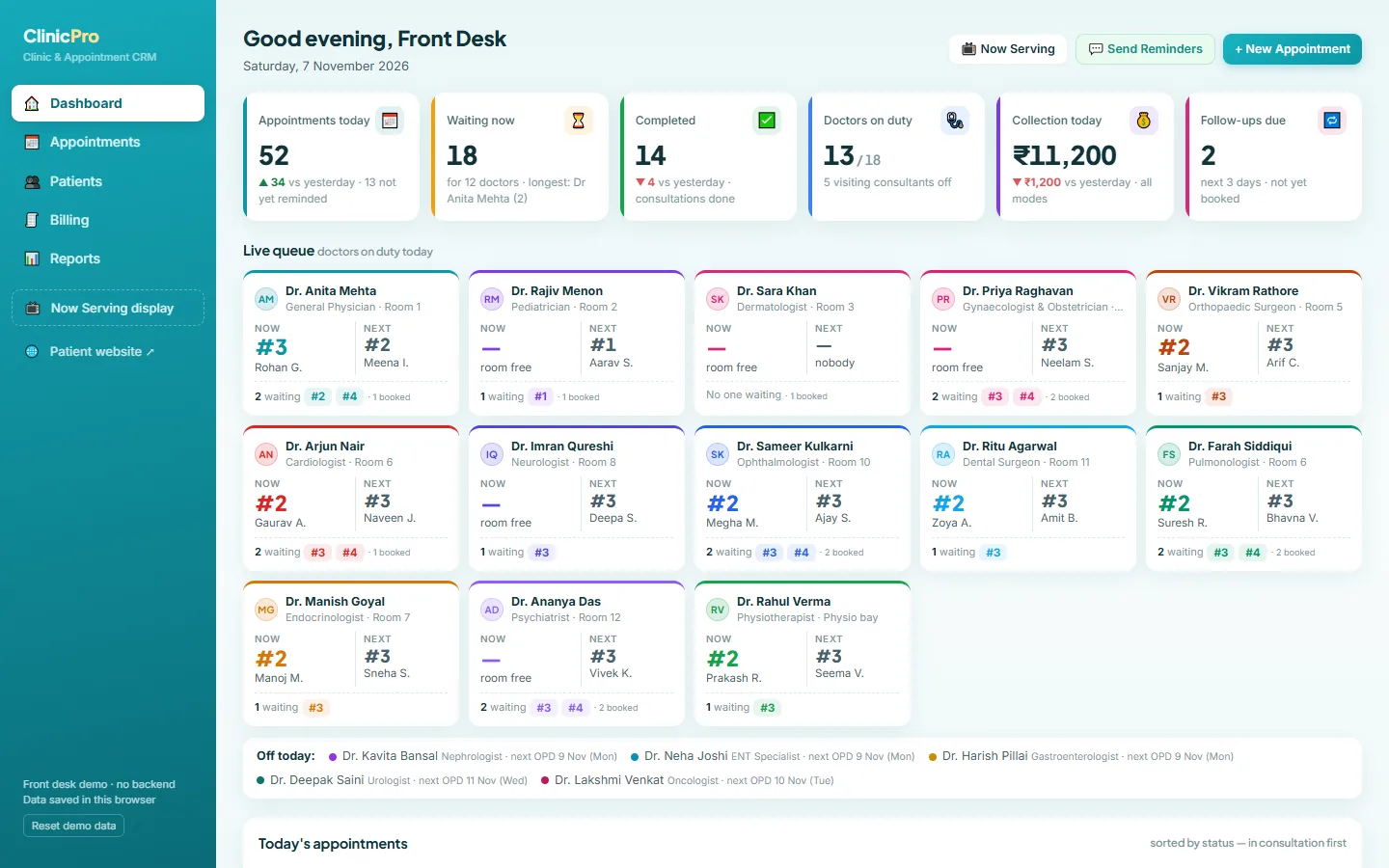 ClinicPro live demoOpen the clinic CRM and the patient website side by side. Book on one, watch it land in the slot grid on the other, then run the token queue, write a prescription and bill the visit.Open →
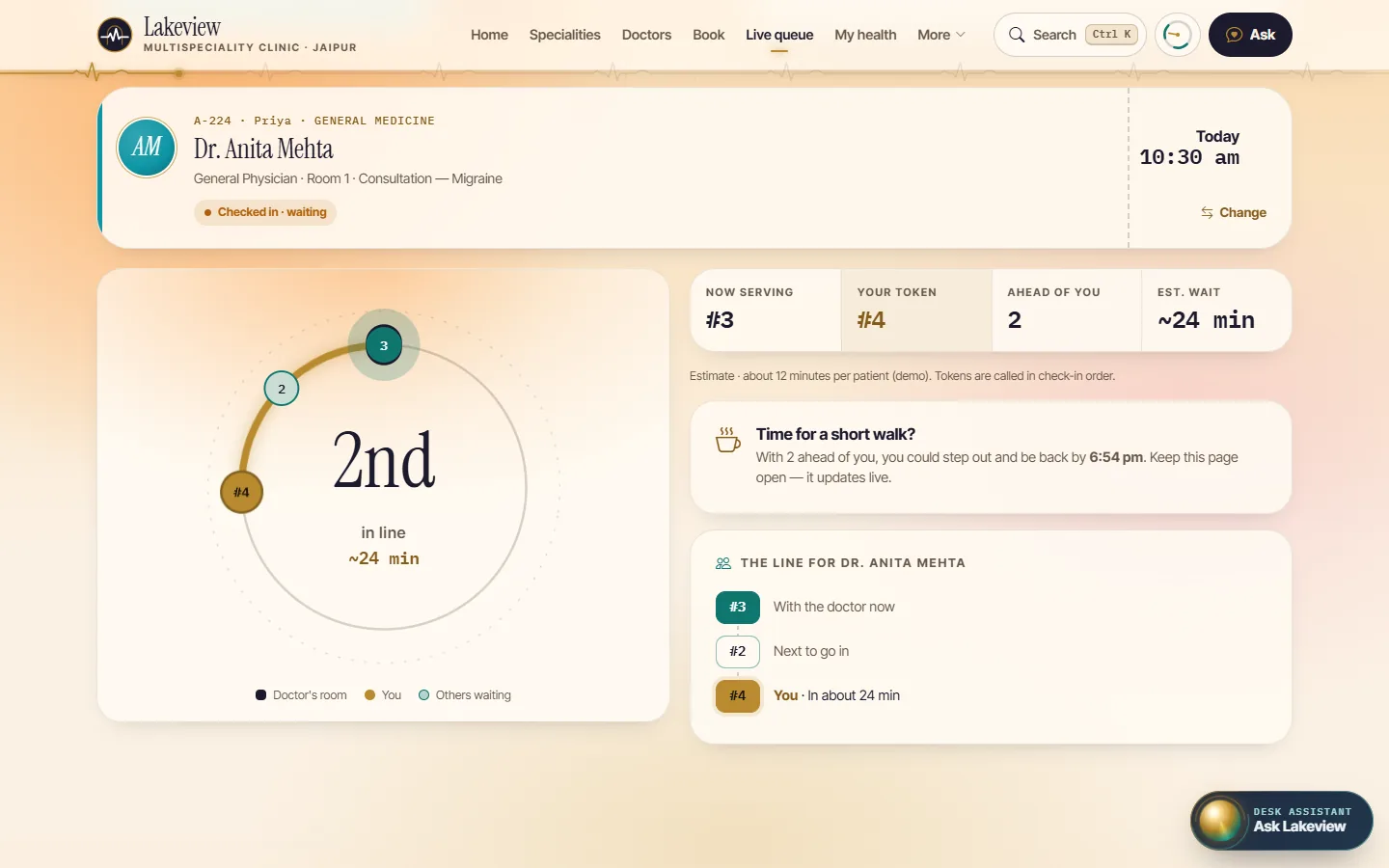 ClinicPro: clinic website and softwareThe full product page: 18 specialities, video consults, pre-visit check-in, the live token tracker, every screen of the website and CRM, and the rollout plan.Open →
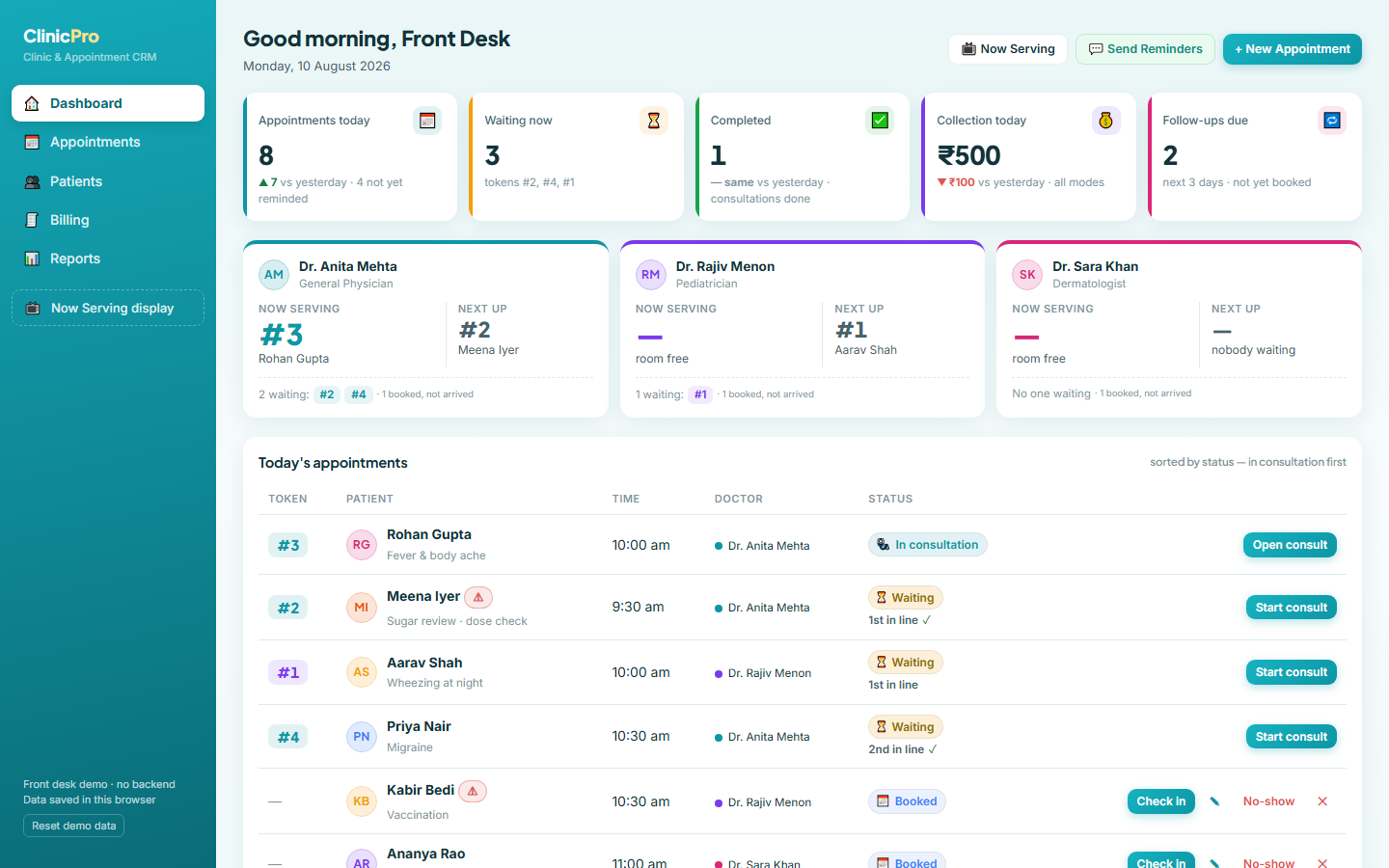 ClinicPro CRM in detailA module-by-module tour of the reception software: queue, appointments, consultations, patients, billing and the Now Serving display, with screenshots and the roadmap for the live system.Open →
Our stack for this work
What affects the cost of clinic management software
A solo GP and an 18-speciality centre need very different set-ups, so there is no honest flat price. These factors move the quote; share your details and we send a fixed price after a free consultation.
More doctors means more rosters, templates and logins to configure. A second branch adds a shared patient registry and per-branch reports.
The clinic CRM works on its own. Adding the patient website with booking, token tracking and My health adds design and content work.
Connecting a video service, its scheduling and the after-call summary is separate work, scoped only if your clinic needs it.
One-tap WhatsApp links are simple. Automated messages through the WhatsApp Business API, or online payment through a gateway, add set-up and testing.
Starting fresh is quickest. Bringing in patient lists or history from another system depends on how complete and clean that data is.
Hosting in India, backups and a support retainer after launch are quoted separately, so you can see exactly what you pay for.
Clinic management software: questions people ask
What is clinic management software?
Clinic management software runs the daily work of an OPD: appointments, the token queue, prescriptions, patient records, follow-ups and billing. ClinicPro does all of these in one system for reception and doctors, and can be paired with a patient website so online bookings land in the same slot grid that reception already uses.
Does ClinicPro work for a single-doctor clinic?
Yes. It suits single-doctor clinics, polyclinics and multi-speciality centres. The demo shows a clinic with 18 specialities so you can see visiting consultants and OPD days at work, but your set-up can have one doctor or many, with the same token queue, prescriptions and billing.
Can patients see their token number and waiting time?
Yes. With the patient website, patients track their token, their position in the queue and the expected wait on their phone, with a “leave home at” planner. In the clinic, the Now Serving display shows large token numbers per doctor on any TV and updates live from the desk.
Can doctors and reception use it as doctor appointment software only?
Yes. Many clinics start with appointments and the token queue at reception and add prescriptions, billing or the patient website later. The slot grid works as doctor appointment software on its own: per-doctor day views, free-slot picker, reschedule and cancel, with no double booking.
Is patient data safe?
The demo keeps everything in your own browser and sends nothing anywhere. A live clinic system adds OTP login for patients, staff logins with roles, encrypted hosting in India and regular backups, scoped with you during rollout, with roles deciding who sees clinical notes.
Does it connect to ABHA or the Ayushman Bharat Digital Mission?
Not today. ABDM linking, such as ABHA IDs and sharing health records, is not part of ClinicPro or its demo. If your clinic needs it, tell us on the demo call and we will scope it as a separate integration after checking the current ABDM requirements with you.
How long does it take to set up clinic management software?
ClinicPro usually goes live in about four to six weeks. The first two weeks cover doctors, sessions, fees and prescription templates; then the website if you want it, then reception and doctor logins, WhatsApp and UPI. The go-live week puts the Now Serving display on your waiting-room TV.
How much does ClinicPro cost?
It depends on the number of doctors, whether you take the patient website too, and integrations such as video consults, the WhatsApp Business API or online payments. Share your details on WhatsApp and we send a fixed quote after a free consultation. There are no prices on this page because no two clinics are set up the same way.
See the token queue run with your clinic’s name
WhatsApp +91 63774 18934 or email team@ezibelltech.com with your number of doctors and OPD timings. We’ll walk you through the live demo and send a fixed quote.