Salon Management Software for Booking, Billing and Clients
SalonPilot is salon management software for the front desk: a stylist calendar in 15-minute slots, checkout with GST, member discounts, wallet and split pay, client profiles with colour formulas and patch tests, commissions, stock and reports. Open the live demo or read the SalonPilot overview.
Updated- Team in Jaipur, India
- MSME & GST registered
- Live product demos you can try
Salon management software earns its place on a Saturday evening, not in a feature list. Four stylists are busy, two walk-ins are waiting, a regular wants “the same shade as last time”, and the bill has a member discount, a gift card and a tip. Many salons still handle this with a paper book and one person’s memory. SalonPilot puts the day on one screen: who is in which chair, who is next, what each client had last time and what she owes, so the desk stops guessing.
It suits a single-chair studio, a multi-chair unisex salon, a spa and a bridal makeup studio; your set-up can have one stylist or many. The live demo runs a fictional salon with eight team members at three levels (Stylist, Senior Stylist and Creative Director), each with their own prices, roster and commission. Open the front-desk software and the salon website side by side: book a stylist on the website and the appointment appears in her column in the calendar, marked as booked online. Everything runs in your browser with sample data.
Ezibell Tech, an MSME and GST-registered software company in Jaipur, builds and sets up SalonPilot, usually in about four to six weeks. This page covers the software at the front desk. It works on its own or with a client website that shows live chairs, a Look Studio and online booking with deposits; for that side, see SalonPilot: salon website and salon software.
What the salon management software does
Today: the live floor
The desk’s home screen shows every chair as it is now (in service, free or off today), the day’s timeline, arrivals, the walk-in waitlist, new online bookings, unpaid bills and alerts. Walk-ins join the waitlist and are seated in a tap when a chair frees up.
Stylist calendar in 15-minute slots
Stylists as columns, 15-minute rows, and a week view per stylist. Book, move or cancel appointments and mark arrivals and no-shows. A busy stylist cannot be booked twice, and website bookings arrive in the same calendar marked as online, so phone and web never clash.
Checkout with GST billing
One bill for services, retail, memberships, packages and gift cards, with GST at 18% as CGST and SGST in the demo. Member discounts apply themselves, wallet credit and gift cards are redeemed on the bill, payment splits across UPI QR, card and cash, and a tip is recorded against the stylist.
Client profiles with colour formulas
Each client’s visits, spend, membership, wallet and points, preferred stylist, allergies, birthday and notes, plus colour formulas and patch-test dates. Filters for members, birthdays this week, allergies and clients not seen for eight weeks send rebooking calls to the right people.
Patch-test check before colour
When a colour service is booked, the appointment shows whether the client has a recent patch test. If one is needed, the desk is reminded to do it at least 48 hours before, and a patch-test message draft is ready to send, so a busy evening does not skip the check.
Team, rosters and commissions
Weekly rosters, days off, the services each person does, their commission percentage, a separate retail commission, daily attendance, and performance for any date range: service revenue, retail sold, bills and tips per stylist. Incentive talks start from the same numbers for everyone.
Inventory: retail and back-bar
Retail products sold to clients and back-bar stock used on services, such as colour tubes and developer, kept apart. Record stock in and out with a reason, see stock value at cost, and get a reorder list when anything falls below its level, before the colour runs out mid-week.
Memberships, packages and gift cards
Membership tiers with a discount and wallet credit, service packages with sessions to redeem, and gift cards with balances. Everything sold at checkout or on the website appears in one place, with balances the desk can check and redeem against the next bill.
Choosing salon software in India: what to test first
Test a real evening, not a brochure. Ask any vendor to show a colour client who arrives late, a walk-in who wants a senior stylist, and a bill with a member discount, a gift card, a retail product, a UPI and cash split and a tip. If that needs many screens or a calculator, the desk will go back to paper on the first busy Saturday.
Then check level pricing and the client record. Most Indian salons charge more for a senior stylist than a junior, so the bill should take the price from the stylist booked, not from memory. The client record matters as much: a colour formula, a patch-test date and an allergy note are what make a regular feel known, and what protect the salon if a reaction ever happens.
- Stylists as calendar columns, with no double booking
- Prices by stylist level, applied automatically
- Colour formulas, allergies and patch tests on the client record
- Discount, wallet, gift card, split payment and tip on one bill
- Commissions and performance from the same bills
Salon billing and appointment software: why one system matters
Salon billing and appointment software works best as one system, because every bill starts as an appointment. In SalonPilot the desk opens checkout from the appointment, so the services, the stylist and her level price are already on the bill. Retail products, a membership or a gift card can be added before payment. That link is what makes the reports trustworthy: revenue by stylist, services against retail and no-shows all come from the same records.
Tax and incentives are your rules, applied by the software. The demo applies GST at 18% as CGST and SGST and prints a receipt. For your salon we set the GST details and receipt format to what your CA confirms; we are a software company and do not give tax advice. Commission percentages, retail commission and member discounts are settings, so changing a rule changes every bill from then on without retraining the desk.
Client data, the demo and what a live rollout adds
A salon holds personal data: phone numbers, birthdays, photos of past looks, allergies and patch-test results. India’s Digital Personal Data Protection Act, 2023 expects personal data to be collected for a clear purpose and looked after. In practice that means staff logins with roles, hosting in India, regular backups and messages sent one-to-one to your own clients, not bought lists. Ask any vendor where the data sits and who can see it.
Be clear about what the demo is. It runs entirely in your browser with sample data. WhatsApp messages are drafts you copy or open in WhatsApp, and the UPI deposit has a demo “mark as paid” button. A live system adds the central database, staff logins, your UPI or a payment gateway and, if you want it, automated messages through the WhatsApp Business API, all scoped with you during rollout. A second branch is scoped the same way.
How we work
- 1Demo call
A short call on WhatsApp or video. We open the demo with your salon’s name on it and note your services, stylist levels, prices, memberships and how you bill today.
- 2Salon set-up
Services, durations, level prices, team, rosters and days off, commission rules, memberships, packages and products are configured in the first two weeks, from your price list or spreadsheets.
- 3Client records
We agree how existing client lists, colour notes and membership balances will be brought in. A clean spreadsheet loads quickly; registers on paper take longer.
- 4Desk, GST and payments
Staff logins, GST details, the receipt format, your UPI or payment gateway and WhatsApp messages from your number are set up and tested with your desk on real bills.
- 5Website, if you want it
Take the client website too and it gets your name, colours and photos, with bookings and the walk-in waitlist flowing into the same calendar. Many salons start with the desk alone.
- 6Go live and support
Go live in about four to six weeks from the first call. We stay on for fixes and changes, and review prices, rosters and commission rules with you once real data comes in.
Why teams choose us
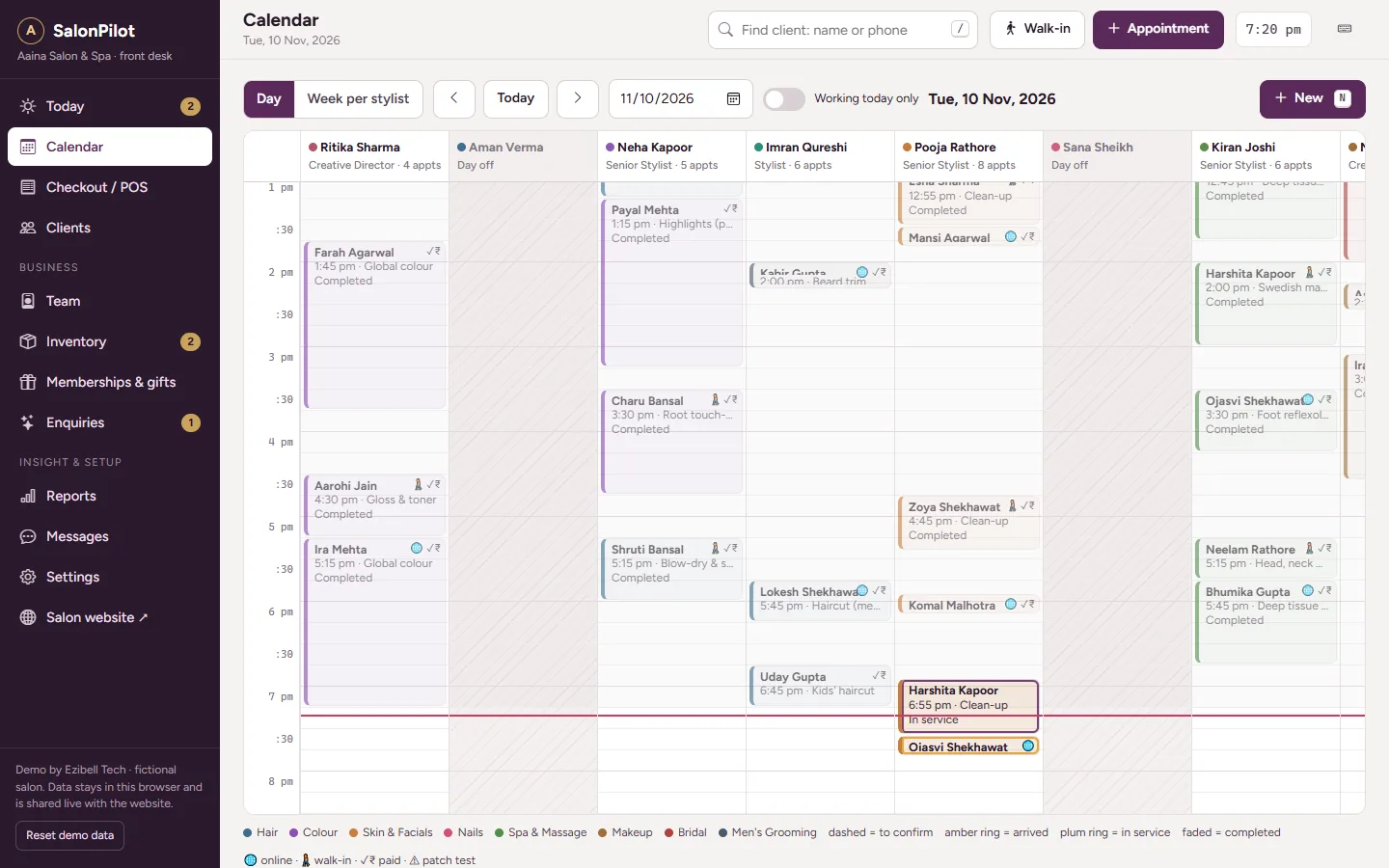 SalonPilot live demoOpen the salon website and the front-desk software side by side. Book a stylist on one, watch the appointment land in her calendar column on the other, then check the client out.Open →
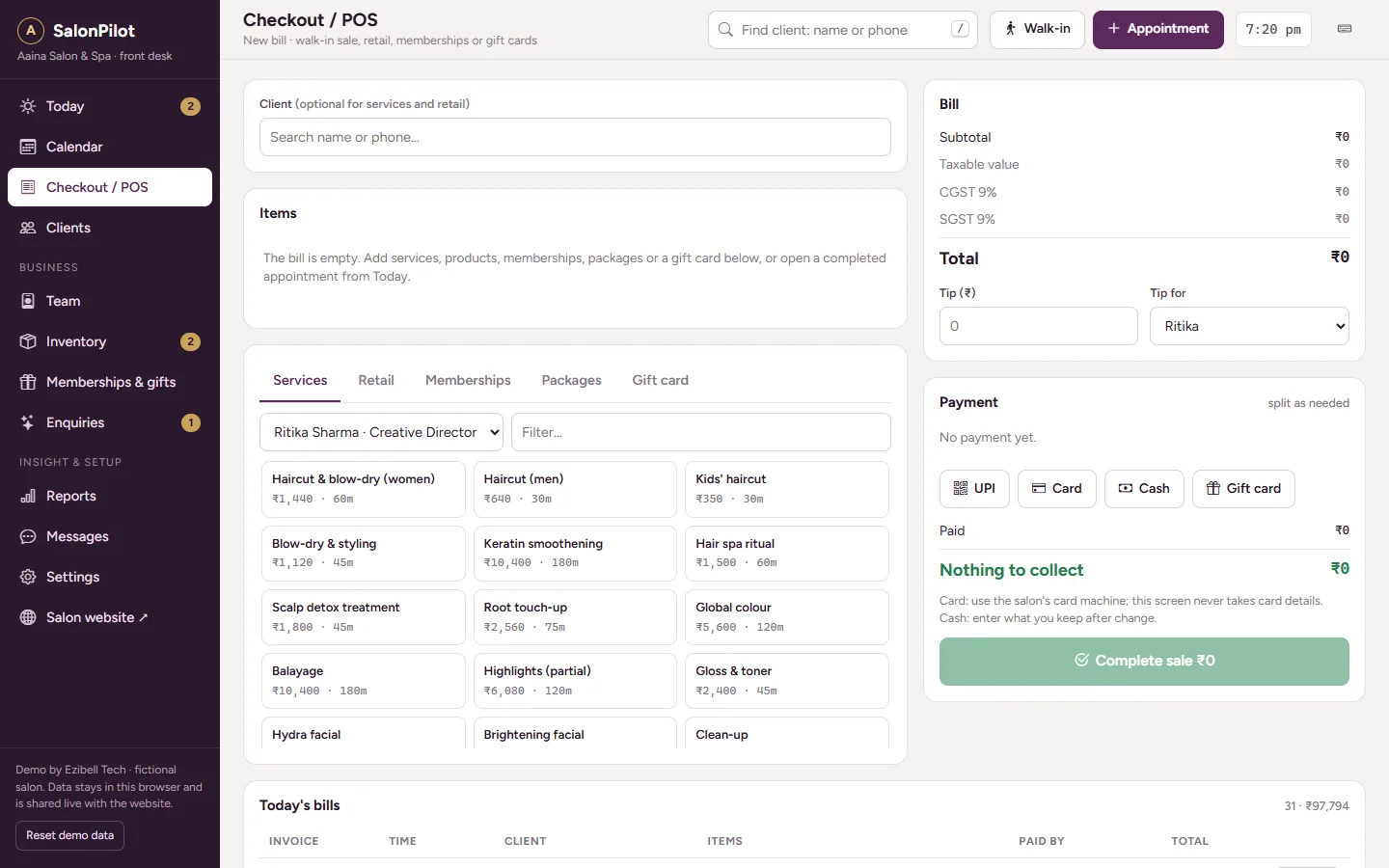 SalonPilot front-desk softwareGo straight to the salon software: today’s live floor, the stylist calendar, checkout with GST and split payments, client profiles with colour formulas, team, inventory and reports.Open →
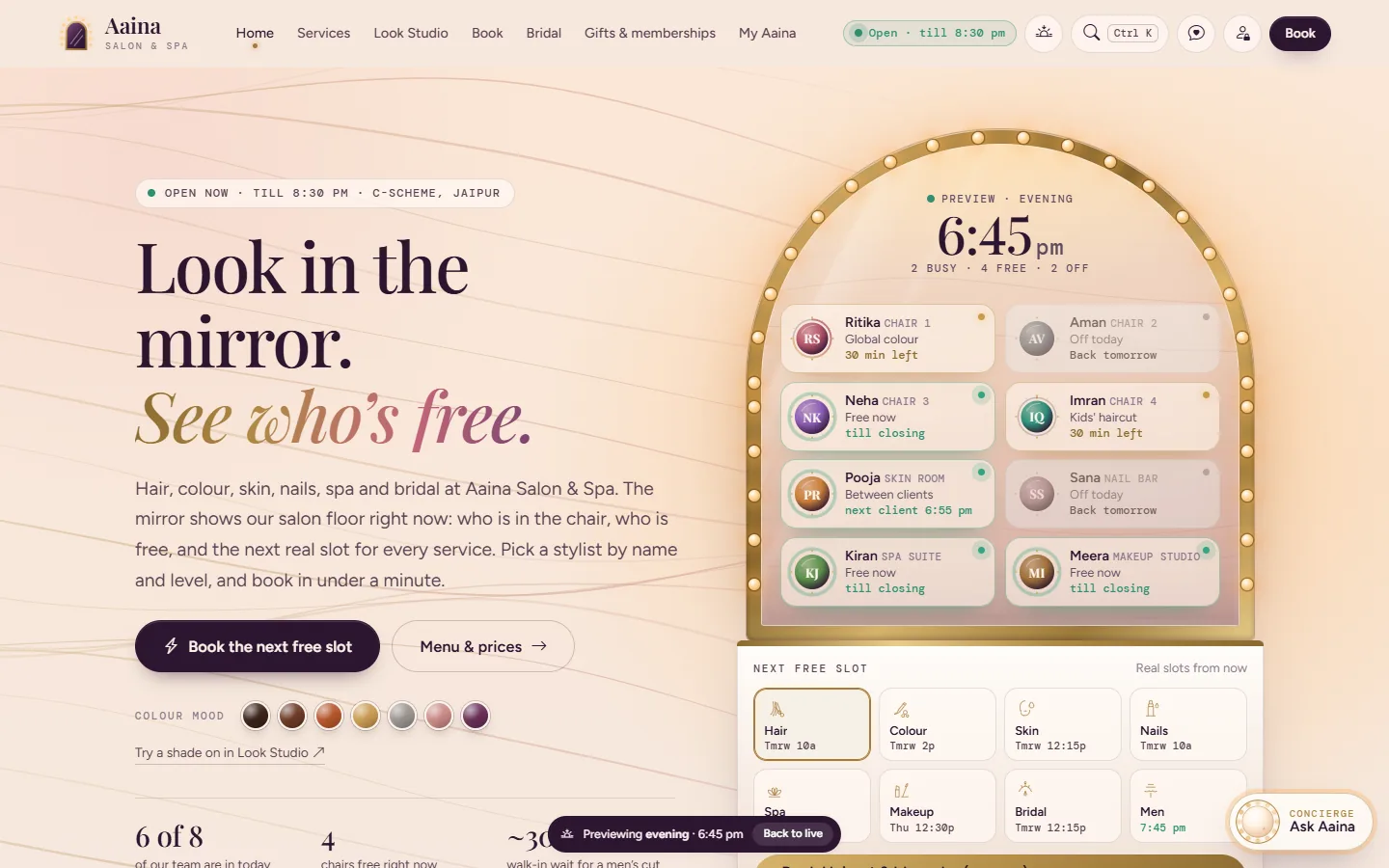 SalonPilot: salon website and salon softwareThe full product page: live chair availability, the price menu by stylist level, the Look Studio, bridal planner, gifts and memberships, every software module and the rollout plan.Open →
Our stack for this work
What affects the cost of salon management software
A single-chair studio and a multi-stylist salon with a spa need different set-ups, so there is no honest flat price. These factors move the quote; share your details and we send a fixed price after a free consultation.
More stylists mean more rosters, level prices, commission rules and logins to configure. A second branch adds shared clients and per-branch reports, scoped at rollout.
The salon software works on its own. Adding the client website with live chairs, the Look Studio, booking and gift cards adds design and content work.
A long service menu with level prices, several membership tiers and packages takes longer to set up and test than a short, flat price list.
A UPI QR with confirmation at the desk is simplest. A payment gateway, or automated messages through the WhatsApp Business API, adds integration and testing.
Starting fresh is quickest. Bringing in client lists, colour notes and membership balances depends on how complete and clean that data is.
Hosting in India, backups and a support retainer after launch are quoted separately, so you can see exactly what you pay for.
Salon management software: questions people ask
What is salon management software?
Salon management software runs the daily work of a salon: the stylist calendar, walk-ins, billing, client records, memberships, staff commissions, stock and reports. SalonPilot does all of these in one system for the front desk, and can be paired with a client website so online bookings land in the same calendar the desk already uses.
Is SalonPilot salon software made for India?
Yes. It is built around how Indian salons work: prices by stylist level, UPI QR payments, GST on the bill, WhatsApp-first messages to clients, bridal enquiries and memberships with wallet credit. The website assistant answers in English and Hinglish, and the team that builds and supports it is in Jaipur.
Can it handle GST billing?
Yes. Checkout puts services, products, memberships, packages and gift cards on one bill, and the demo applies GST at 18% as CGST and SGST with a printed receipt. For your salon we set the GST details and receipt format to what your CA confirms. Filing returns stays with your CA.
Can we use it as salon billing and appointment software only?
Yes. Many salons start with the calendar and checkout at the desk and add memberships, inventory or the client website later. The calendar and billing work on their own: book a stylist, mark the arrival, check out from the appointment and print the receipt.
Does it send WhatsApp reminders automatically?
Not in the demo. The demo prepares reminder, birthday, rebook, thank-you and patch-test messages with the client’s name, service and stylist filled in, for the desk to copy or open in WhatsApp. Automated sending through the WhatsApp Business API is scoped during rollout if your salon wants it.
Can clients pay a deposit when they book online?
Yes, if you take the client website. The deposit amount is set in the software’s settings, and the demo shows a UPI QR with a demo “mark as paid” button. The paid deposit appears as a locked payment at checkout. For your salon we connect your UPI or a payment gateway during rollout.
How long does it take to set up salon management software?
SalonPilot usually goes live in about four to six weeks. The first two weeks cover services, level prices, team, memberships and products; then the client website if you want it; then staff logins, GST, UPI and WhatsApp. Launch week puts the booking link in your Instagram bio and Google profile.
How much does SalonPilot cost?
It depends on the number of stylists and branches, whether you take the client website too, and integrations such as a payment gateway or the WhatsApp Business API. Share your details on WhatsApp and we send a fixed quote after a free consultation. There are no prices on this page because no two salons are set up the same way.
See your salon’s Saturday on one screen
WhatsApp +91 63774 18934 or email team@ezibelltech.com with your number of stylists and the services you offer. We’ll walk you through the live demo and send a fixed quote.